

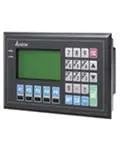
Delta TP08 — text operator panel with extended capabilities
The TP08 series from Delta Electronics belongs to the text operator panel lineup designed for displaying equipment parameters and configuring industrial controllers. Unlike the smaller TP02 and TP04 series, the TP08 features an enlarged 3.8-inch display with 240x128 pixel resolution and two communication ports, making it the optimal solution for systems with multiple devices on a single bus.
Delta TP08 technical specifications
The TP08 panel is built on a monochrome STN LCD display with black-and-white rendering. The text output format is 8 rows by 20 characters, which is twice the capacity of the TP04 series (4x20) and significantly more than the TP02 (2x20). Two communication ports support RS232, RS422, and RS485 interfaces with the Modbus protocol, allowing simultaneous connection to a PLC and a variable frequency drive without additional converters.
- Display: 3.8" monochrome STN LCD
- Resolution: 240 x 128 pixels
- Text format: 8 rows x 20 characters
- Communication ports: 2 (RS232 / RS422 / RS485)
- Protocol: Modbus
- USB port: none
TP08 series model in the catalogue
| SKU | Display | Resolution | Ports | Interfaces |
|---|---|---|---|---|
| TP08G-BT2 | 3.8" B/W STN LCD | 240x128 | 2 | RS232, RS422, RS485 |
Delta TP08 panel applications
TP08 series text panels are used for monitoring and configuring industrial equipment where a graphical interface is not required, but more data needs to be displayed than compact models allow. Typical application scenarios:
- Displaying VFD parameters (frequency, current, voltage, fault status)
- Configuring PLC setpoints without a computer connection
- Monitoring pump stations, ventilation systems, and conveyor lines
- Controlling simple processes through a button-based menu
Two Modbus ports allow simultaneous data exchange with multiple devices, such as a Delta DVP PLC and a variable frequency drive, simplifying the construction of small automation systems without additional gateways.
Other Delta text panel series
Delta Electronics produces several text operator panel series with different screen sizes and port counts. The TP02 series has a 3" display (2x20 characters, 1 RS232 port), the TP04 series offers 3-4.1" (4x20 characters, 1-2 ports), while the TP08 provides maximum text-format information density (8x20 characters, 2 ports). For tasks requiring a graphical touchscreen interface, consider the DOP-A and DOP-B series.
Warranty and support
All Delta Electronics operator panels sold through Chastotnik.ua come with a manufacturer's warranty. Our specialists will help with model selection for your specific task, PLC connection, and Modbus protocol configuration.