

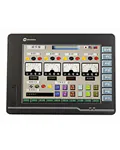
Shihlin Electric EU2000 Series Operator Panels
The EU2000 series from Taiwanese manufacturer Shihlin Electric is a range of graphic touchscreen operator panels (HMI) designed for building intuitive control interfaces for industrial equipment. EU2000 panels combine reliability, versatile communication capabilities, and competitive pricing, making them an optimal choice for mid-range automation tasks.
All models in the series are equipped with RS232, RS422, and RS485 ports, support the Modbus protocol, and feature USB ports in host/client configuration. Models with the "11" suffix additionally include an Ethernet port and TCP/IP protocol support for industrial network integration.
EU2000 Panel Technical Specifications
The series offers two screen sizes — 5.7 and 10.4 inches. Each size is available with a TFT matrix (65,536 colors) or an STN display (monochrome, white-blue). The comparison table below covers all available models.
EU2000 Series Model Range
| Part Number | Screen Size | Display Type | Resolution | Ports | Protocols |
|---|---|---|---|---|---|
| EU206CT00 | 5.7" | TFT, 65536 colors | 320×240 | 2 (RS232/422/485) | Modbus |
| EU206CT11 | 5.7" | TFT, 65536 colors | 320×240 | 3 (RS232/422/485 + Ethernet) | Modbus, TCP/IP |
| EU206GS00 | 5.7" | STN, monochrome | 320×240 | 2 (RS232/422/485) | Modbus |
| EU206GS11 | 5.7" | STN, monochrome | 320×240 | 3 (RS232/422/485 + Ethernet) | Modbus, TCP/IP |
| EU210CT00 | 10.4" | TFT, 65536 colors | 800×600 | 2 (RS232/422/485) | Modbus |
| EU210CT11 | 10.4" | TFT, 65536 colors | 800×600 | 3 (RS232/422/485 + Ethernet) | Modbus, TCP/IP |
EU2000 HMI Application Areas
EU2000 series panels are used for process visualization and control across various industries:
- Machine building — displaying operating parameters and equipment diagnostics
- Packaging lines — speed control, counters, recipe management
- Water treatment and pumping stations — pressure, level, and flow monitoring
- HVAC systems — climate unit control via Modbus communication
- Small production lines — where an affordable yet functional HMI interface is required
With Modbus RTU/TCP support, EU2000 panels integrate seamlessly with Delta panels, variable frequency drives, PLCs, and other automation devices.
Other Operator Panel Series
In addition to EU2000, our catalog features a wide selection of HMI panels from leading manufacturers. Kinco panels offer enhanced capabilities for medium to large-scale projects, while Schneider Electric delivers premium quality for critical industrial facilities. Browse the complete operator panel catalog to find the optimal solution.
Warranty and Support
All Shihlin Electric EU2000 series operator panels come with an official manufacturer warranty. Our engineers can assist with model selection for your specific application, communication setup, and commissioning. Delivery available throughout Ukraine.
